Trading Bot Campaign MVP PRD

1. Value Proposition

This section summarizes the confirmed target user, user problem, current situation, product value, expected outcome, and alternatives.

2. Objectives

This section summarizes the confirmed user outcomes, supported workflows, product goals, measurable signals, and MVP boundaries.

3. Mockups (MVP Version)

This section includes only the user-selected static pages. Each row pairs the page screenshot or explicit visual placeholder with its confirmed PRD notes.

Static Page / Screenshot Description
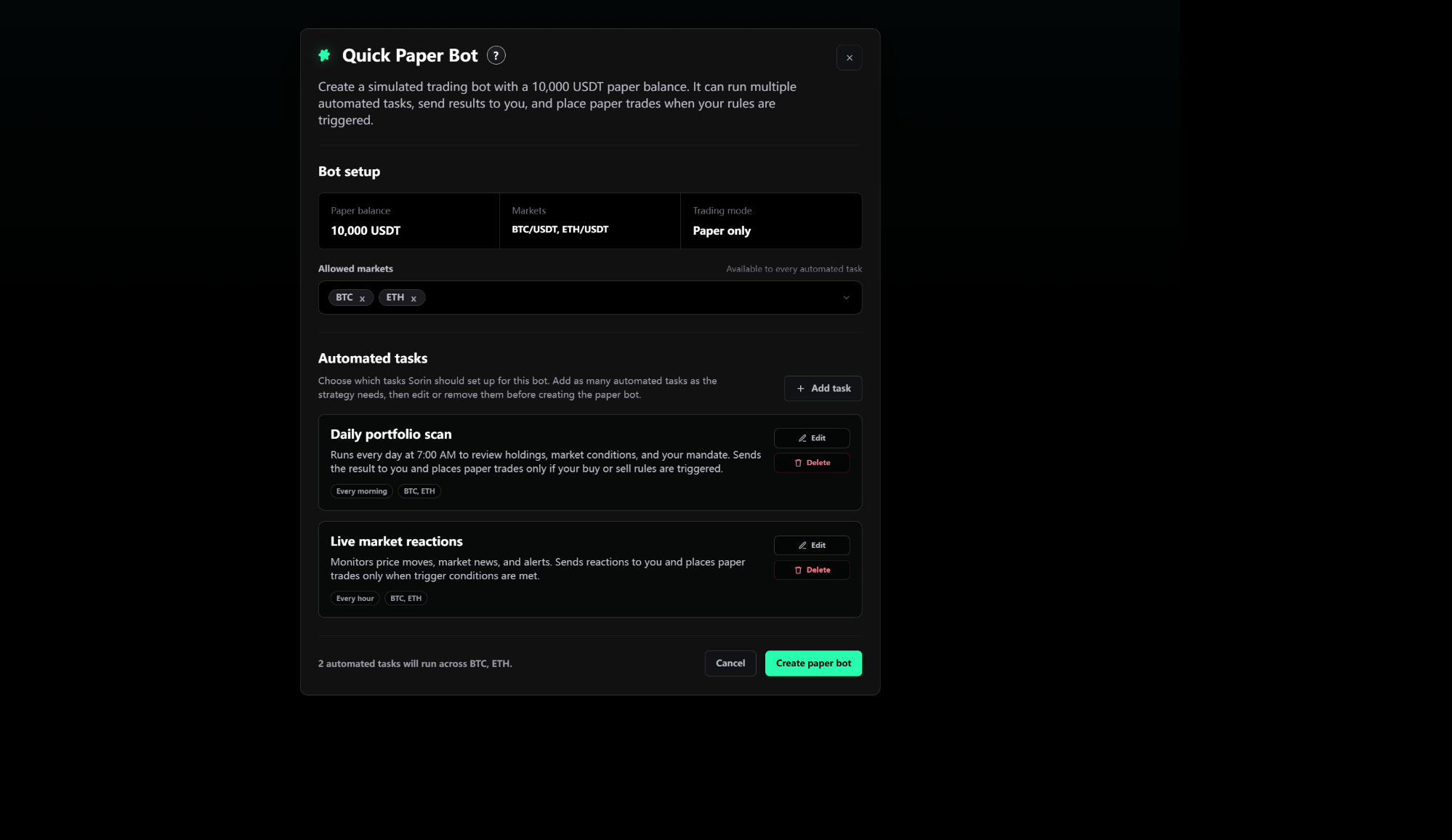
Quick Paper Bot Setup
Quick Paper Bot setup with paper balance, allowed markets, automated tasks, and create action.
Page purpose: Let the user configure and create the simulated paper Trading Bot that powers the Campaign Trading Bot section.

Quick Paper Bot Setup

1. Changes

  • Scope this setup flow to creating a paper Trading Bot for the campaign, not to generic campaign onboarding.
  • Keep the setup as the source of the bot identity, allowed markets, task list, and paper-only trading mode shown later in the Campaign Trading Bot section.
  • Require the setup to support default tasks, task editing, task deletion, adding tasks, and a final Create paper bot action.

2. Current Page Functions

  • Header states that the user is creating a simulated trading bot with a 10,000 USDT paper balance.
  • Bot setup summary shows Paper balance, Markets, and Trading mode, with Trading mode fixed to Paper only.
  • Allowed markets shows selected market chips and must support expanding into a searchable multi-select market picker.
  • Automated tasks area lists task cards with task name, description, schedule chip, market scope chip, Edit, and Delete.
  • Add task opens a composer where the user can select a task template, write instructions, set a task name, choose frequency, and save the task.
  • Footer summarizes how many automated tasks will run and which markets they can use.
  • Create paper bot is the primary completion action; Cancel and close exit setup without creating the bot.

3. Interaction & Navigation

  • Starting paper trading from the Campaign Trading Bot entry opens this setup view.
  • Selecting or removing allowed markets updates both the market chips and the task market availability summary.
  • Edit opens an existing task in the task composer; Delete removes the task from the setup list.
  • Create Task saves a new or edited task and returns to the setup task list.
  • Create paper bot validates that at least one market and one automated task exist.
  • After successful creation, the user returns to the Campaign page and the Trading Bot section changes to the live bot card state.
Campaign Page Trading Bot Section
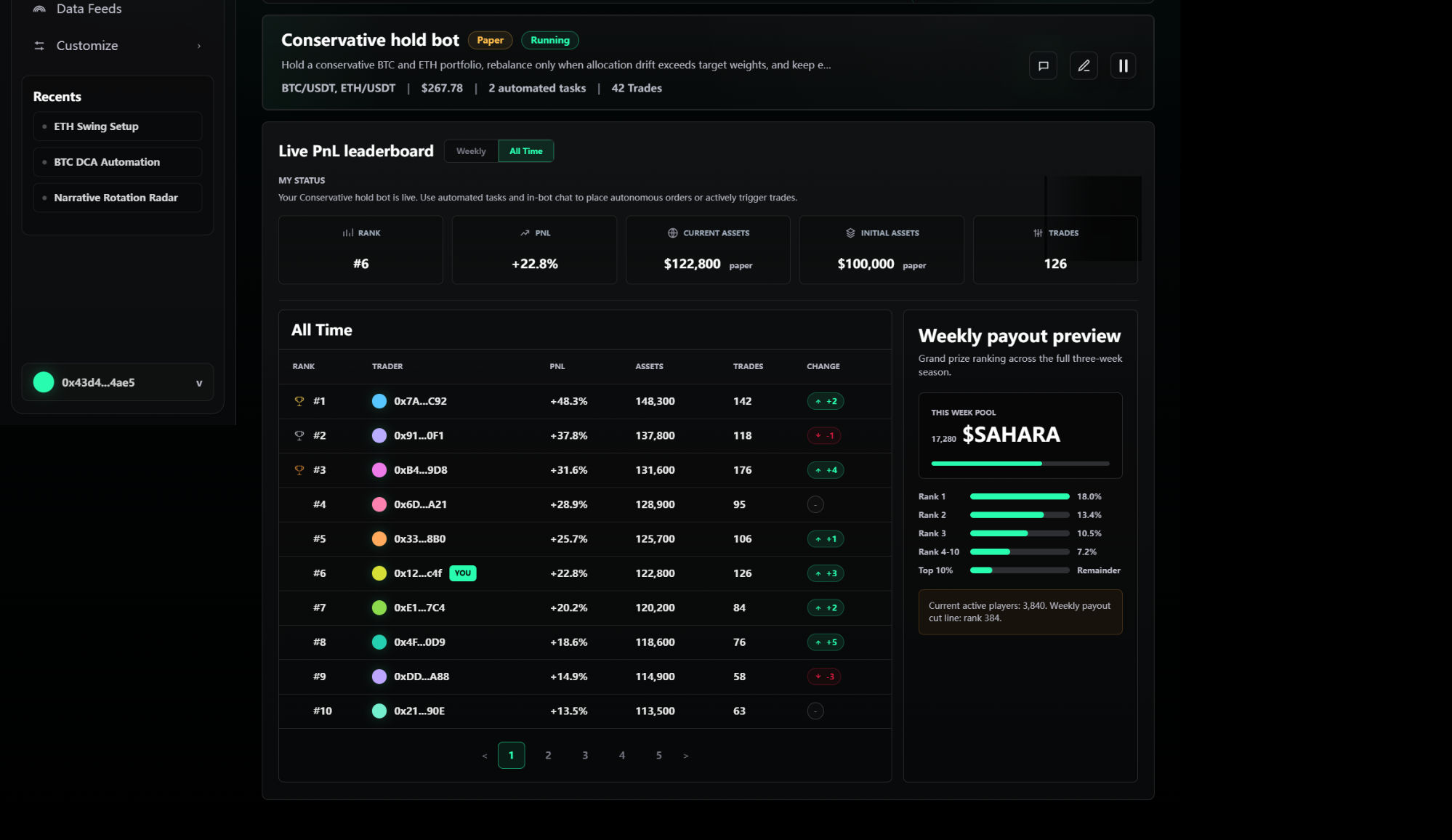
Campaign page showing the Conservative hold bot card above campaign status content.
Page purpose: Show the live paper Trading Bot inside the Campaign page and provide the primary entry into the campaign Trading Bot detail workspace.

Campaign Page Trading Bot Section

1. Changes

  • Document only the Campaign page Trading Bot card and its click-through behavior; do not write leaderboard, payout, or campaign-rule requirements.
  • After a paper bot exists, display a live bot card instead of the pre-start campaign state.
  • Use this card as the primary Campaign entry into the Trading Bot detail workspace.

2. Current Page Functions

  • Bot card shows bot name, Paper badge, Running or Paused badge, mandate summary, market pair list, current paper value, automated task count, and trade count.
  • Card-level actions include opening bot chat/detail, editing the bot, and pausing or resuming the bot.
  • The Running or Paused state must stay consistent with the detail workspace top card and list-page bot cards.
  • The section remains visually distinct from surrounding campaign content so the user can identify it as the active Trading Bot control surface.

3. Interaction & Navigation

  • Clicking the bot card outside icon controls opens the Campaign Trading Bot detail workspace.
  • Keyboard Enter or Space on the bot card opens the same detail workspace.
  • Chat/detail action opens the same campaign detail chat context.
  • Pause or resume toggles the bot running state in the campaign card and must be reflected in the detail workspace.
  • Edit opens bot configuration for the current bot identity instead of creating a duplicate bot.
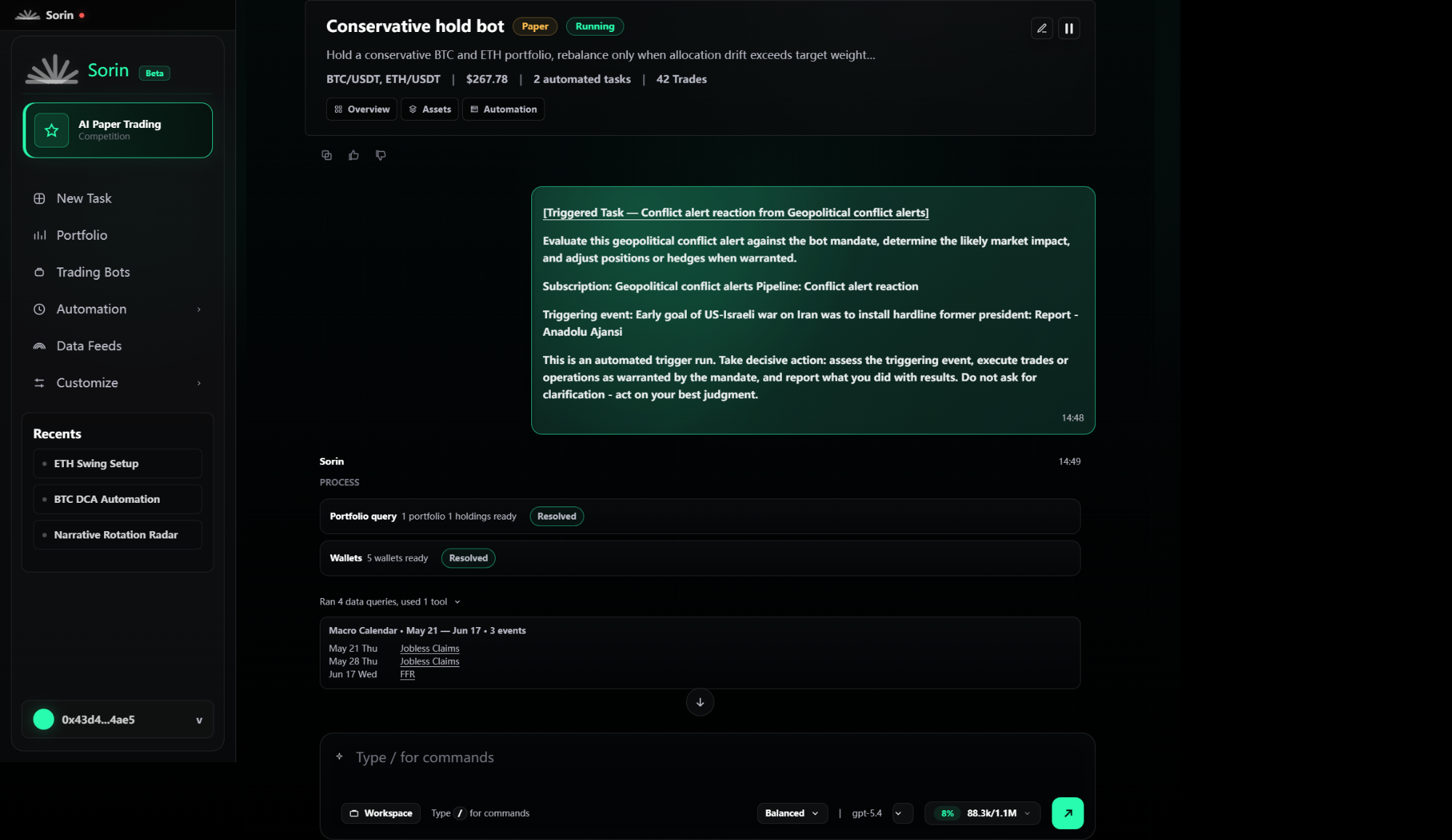
Trading Bot Detail Workspace - Chat
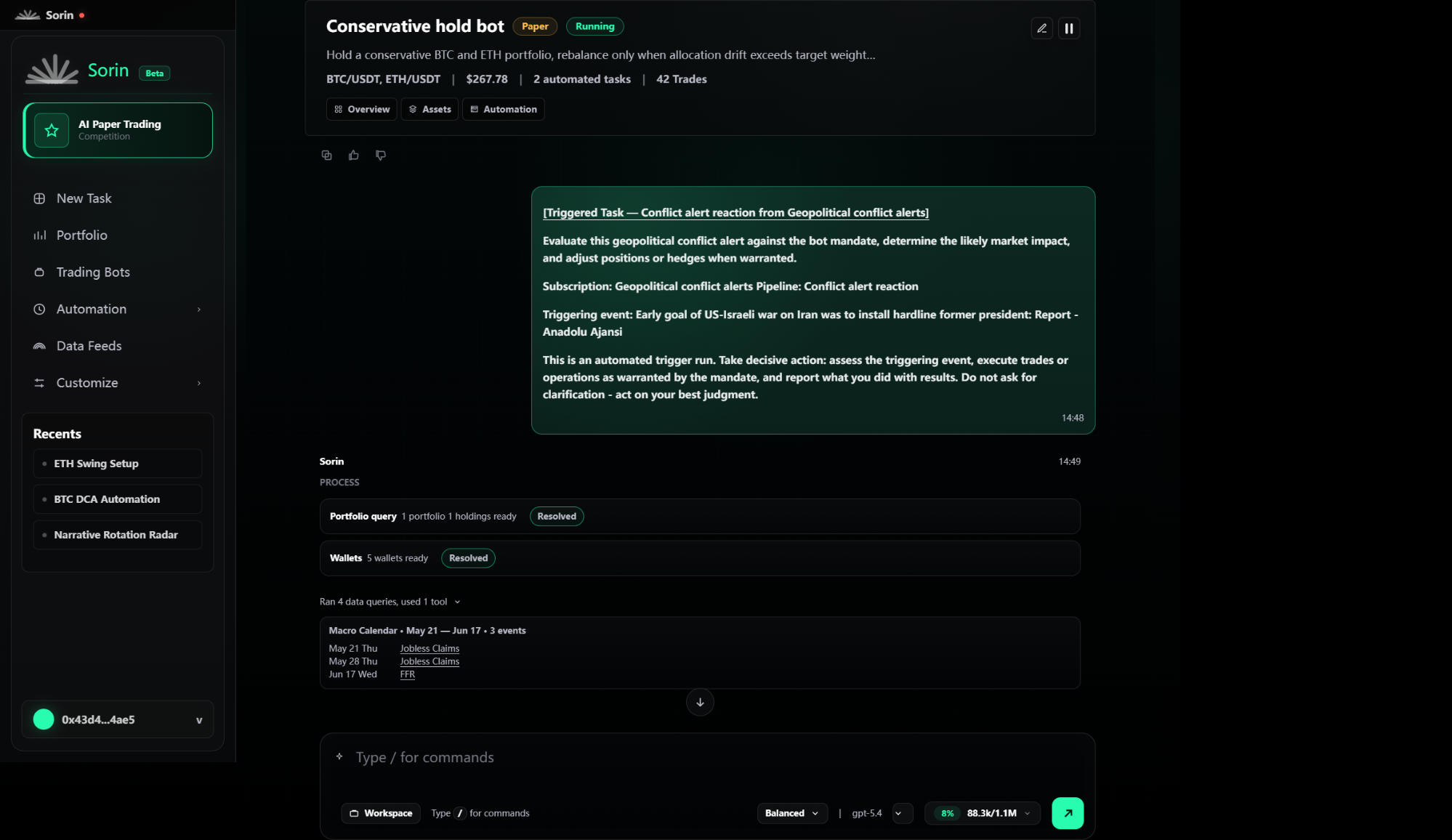
Campaign Trading Bot detail chat with Conservative hold bot card, Overview Assets Automation tabs, and task-fired content.
Page purpose: Provide the main Campaign Trading Bot detail workspace, centered on chat output from the live bot card.

Trading Bot Detail Workspace - Chat

1. Changes

  • Use the Campaign execution detail view as the required Trading Bot detail page, not a separate standalone bot-detail layout.
  • Place the bot summary card above the chat and expose Overview, Assets, and Automation as tabs that open the left drawer.
  • Treat task-fired chat content as a first-class detail state because it is the destination after clicking View in task execution records.

2. Current Page Functions

  • Left app sidebar remains visible with Campaign highlighted, global navigation, recents, and wallet identity.
  • Top bot card shows Conservative hold bot, Paper badge, Running badge, mandate summary, markets, current value, automated task count, trade count, edit action, and pause or resume action.
  • Overview, Assets, and Automation buttons sit inside the bot card and open the contextual drawer on the left side of the detail workspace.
  • Chat thread includes a task-fired user message with a clickable title, source subscription, triggering event, instruction text, timestamp, and bot response process blocks.
  • Sorin response area shows process rows such as portfolio query and wallets, resolved badges, tool run summary, macro calendar output, and command composer.
  • Composer supports typing slash commands, choosing workspace context, model/effort controls, usage meter, and send action.

3. Interaction & Navigation

  • Opening the Campaign bot card lands in this chat workspace with the selected bot context loaded.
  • Overview opens the Overview drawer; Assets opens the Assets drawer; Automation opens the Automation drawer.
  • Pause or resume in the top card toggles the same bot running state used by the Campaign card and Trading Bots list.
  • Clicking the fired-content title opens the Automation drawer and highlights the task that produced that message.
  • The command composer remains available while the user reviews the task-fired content.
  • The detail behavior documented here is reused when a bot is opened from the left-nav Trading Bots list.
Trading Bot Detail Workspace - Overview Drawer
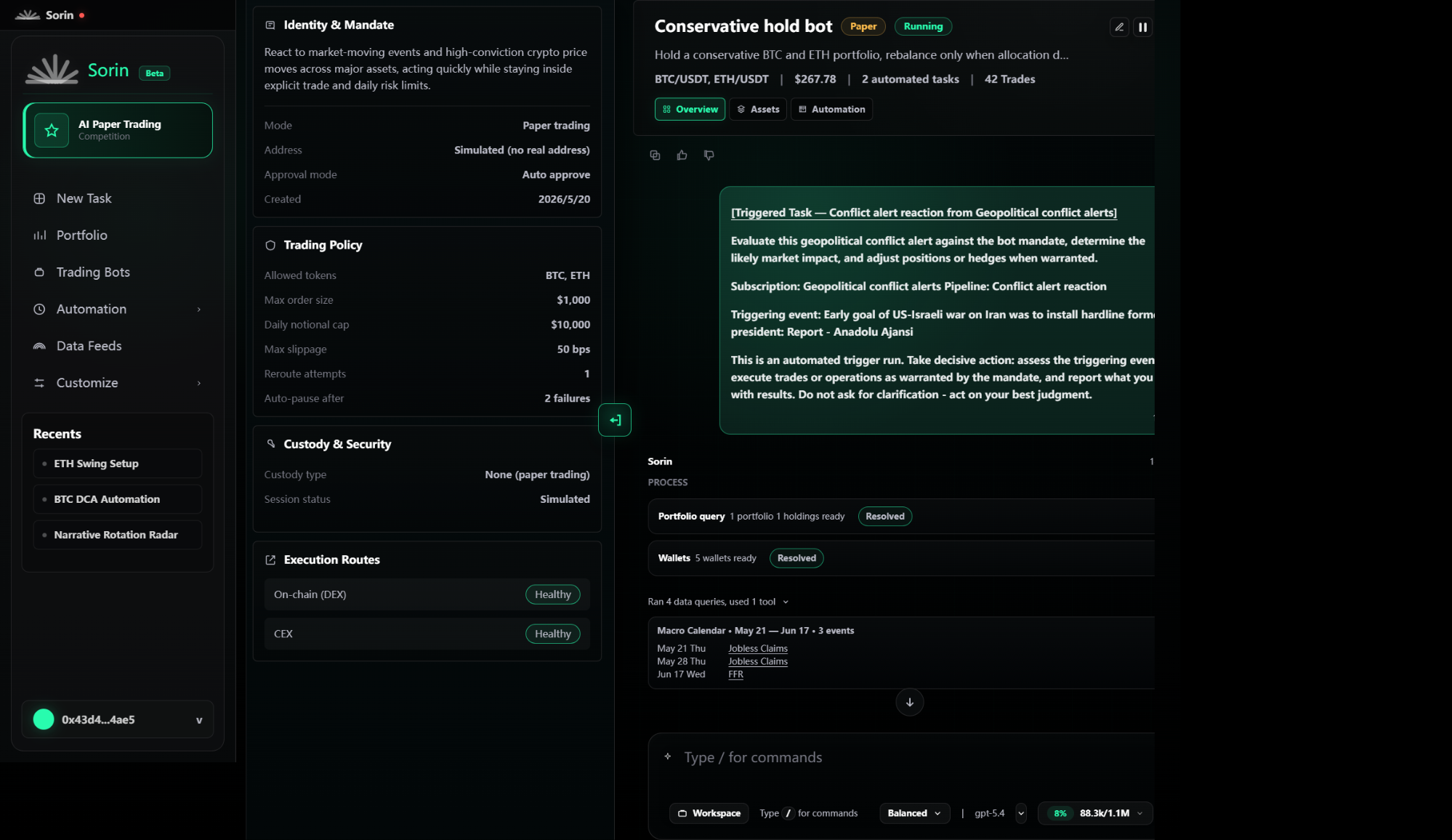
Campaign Trading Bot detail with Overview drawer open beside the chat.
Page purpose: Show bot identity, mandate, trading policy, custody/security, and execution routes after the user clicks Overview in the bot card.

Trading Bot Detail Workspace - Overview Drawer

1. Changes

  • Add this drawer state to the mockups because Overview is reachable from the bot card above chat.
  • Render the drawer as a left-side panel inside the detail workspace while keeping the bot card and chat visible on the right.
  • Keep Overview content tied to the current bot and paper-trading mandate.

2. Current Page Functions

  • Overview tab is active in the top bot card.
  • Drawer shows Identity and Mandate with the bot's event-driven trading mandate.
  • Identity fields include Mode, Address, Approval mode, and Created date.
  • Trading Policy card lists allowed tokens, max order size, daily notional cap, max slippage, reroute attempts, and auto-pause threshold.
  • Custody and Security card shows custody type and simulated session status.
  • Execution Routes card shows route options such as On-chain DEX and CEX with health badges.
  • Drawer close control collapses the panel back to the chat-only detail layout.

3. Interaction & Navigation

  • Clicking Overview opens the drawer and marks Overview active.
  • Clicking Assets or Automation while the drawer is open switches the same drawer to the selected panel.
  • Clicking the drawer collapse control closes the drawer and returns focus to the chat area.
  • The chat content remains in the background and should not be replaced by a separate page route.
  • Overview data must reflect the current bot selected from Campaign or Trading Bots list.
Trading Bot Detail Workspace - Assets Drawer
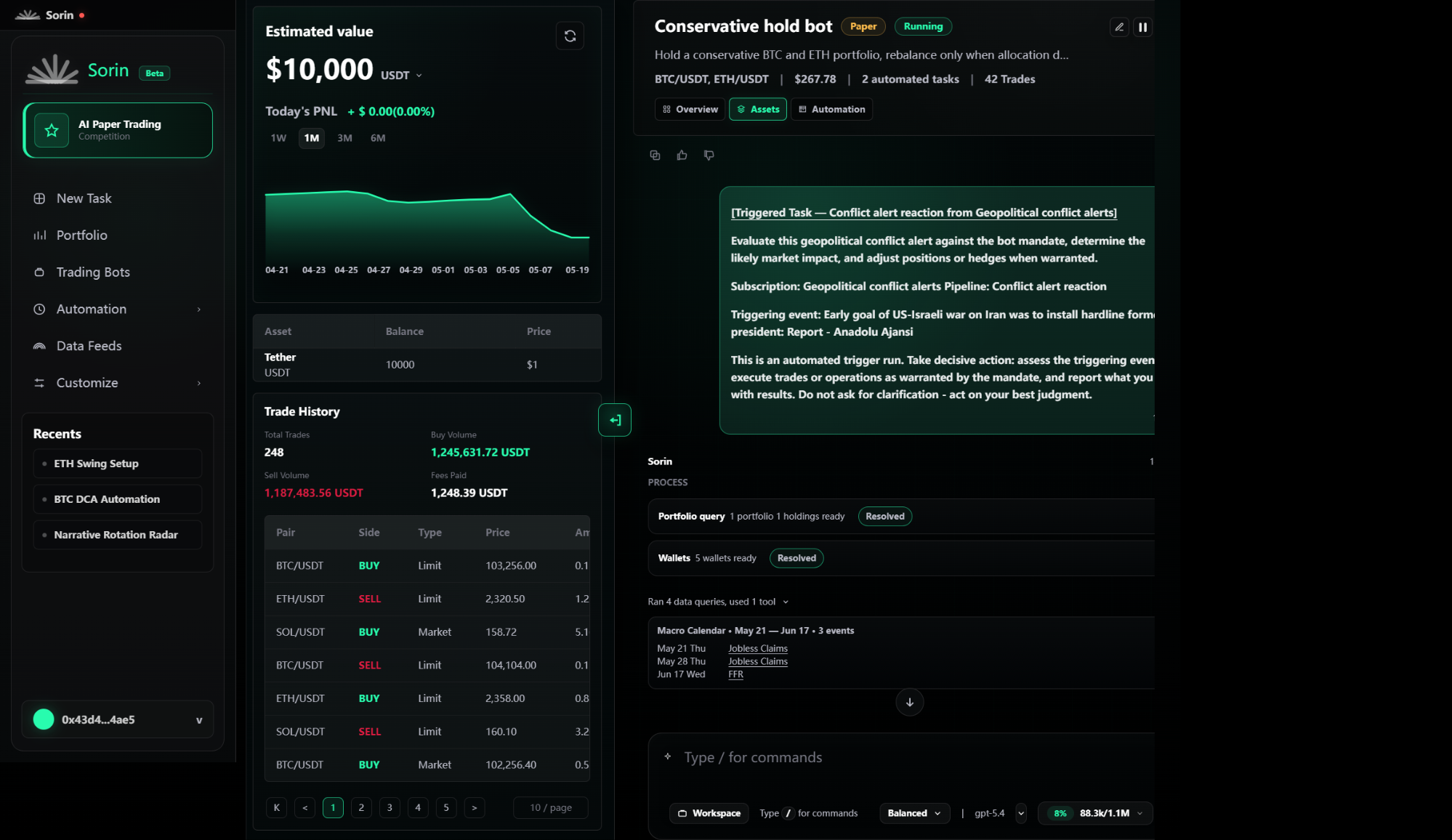
Campaign Trading Bot detail with Assets drawer open beside the chat.
Page purpose: Show current simulated asset value, holdings, chart, and trade history after the user clicks Assets in the bot card.

Trading Bot Detail Workspace - Assets Drawer

1. Changes

  • Add this drawer state to the mockups because Assets is reachable from the bot card above chat.
  • Use the left drawer to expose paper assets without leaving the current chat and task-fired content.
  • Keep assets and trade history scoped to the selected paper Trading Bot.

2. Current Page Functions

  • Assets tab is active in the top bot card.
  • Drawer shows estimated paper value, quote currency, today's PNL, refresh action, and time period tabs.
  • Chart area visualizes the selected period with date labels.
  • Holdings table lists asset, balance, price, and value.
  • Trade History shows summary metrics for total trades, buy volume, sell volume, and fees paid.
  • Trade table lists rows with pair, side, type, price, amount, value, time, and status.
  • Pagination and page-size controls let the user browse trade history records.

3. Interaction & Navigation

  • Clicking Assets opens the drawer and marks Assets active.
  • Period tabs update the chart time range.
  • Refresh reloads the simulated holdings and trade-history data for the current bot.
  • Pagination controls move through trade-history pages without closing the drawer.
  • Clicking Overview or Automation switches the drawer content while preserving the chat state on the right.
  • Collapsing the drawer returns to the chat-only detail layout.
Trading Bot Detail Workspace - Automation Drawer
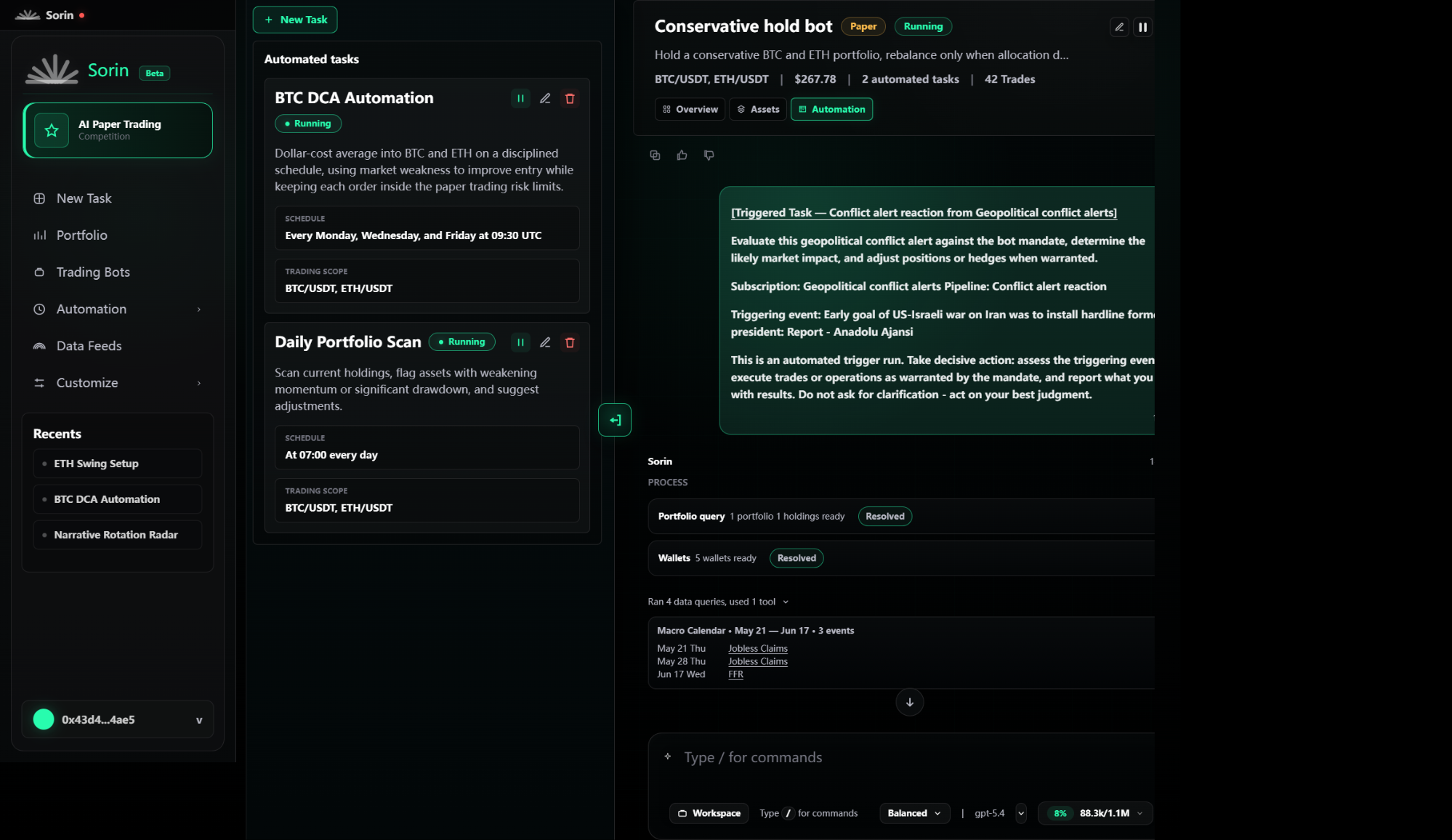
Campaign Trading Bot detail with Automation drawer open and automated task cards visible.
Page purpose: Show automation tasks for the selected Trading Bot after the user clicks Automation in the bot card.

Trading Bot Detail Workspace - Automation Drawer

1. Changes

  • Add this drawer state to the mockups because Automation is reachable from the bot card above chat.
  • Represent automation as task cards inside the campaign detail drawer rather than as a separate automation page.
  • Make each task card the source for opening execution records and for the later task highlight behavior.

2. Current Page Functions

  • Automation tab is active in the top bot card.
  • Drawer includes New Task action and an Automated tasks section.
  • Task cards show task title, Running badge, description, schedule, trading scope, pause or resume control, edit control, and delete control.
  • Visible task examples include BTC DCA Automation and Daily Portfolio Scan.
  • Task status controls indicate whether a task is running or paused.
  • The selected task can be visually highlighted when the user arrives from a fired-content title.

3. Interaction & Navigation

  • Clicking Automation opens the drawer and marks Automation active.
  • New Task opens the task creation flow for the current bot.
  • Pause or resume toggles a task's running state without changing the bot-level Running badge.
  • Edit opens the task configuration for the selected task.
  • Delete starts task removal handling for the selected task.
  • Clicking a specific task opens the Execution Details records modal for that task.
  • Clicking Overview or Assets switches the same drawer to that panel.
Automation Task Records Modal
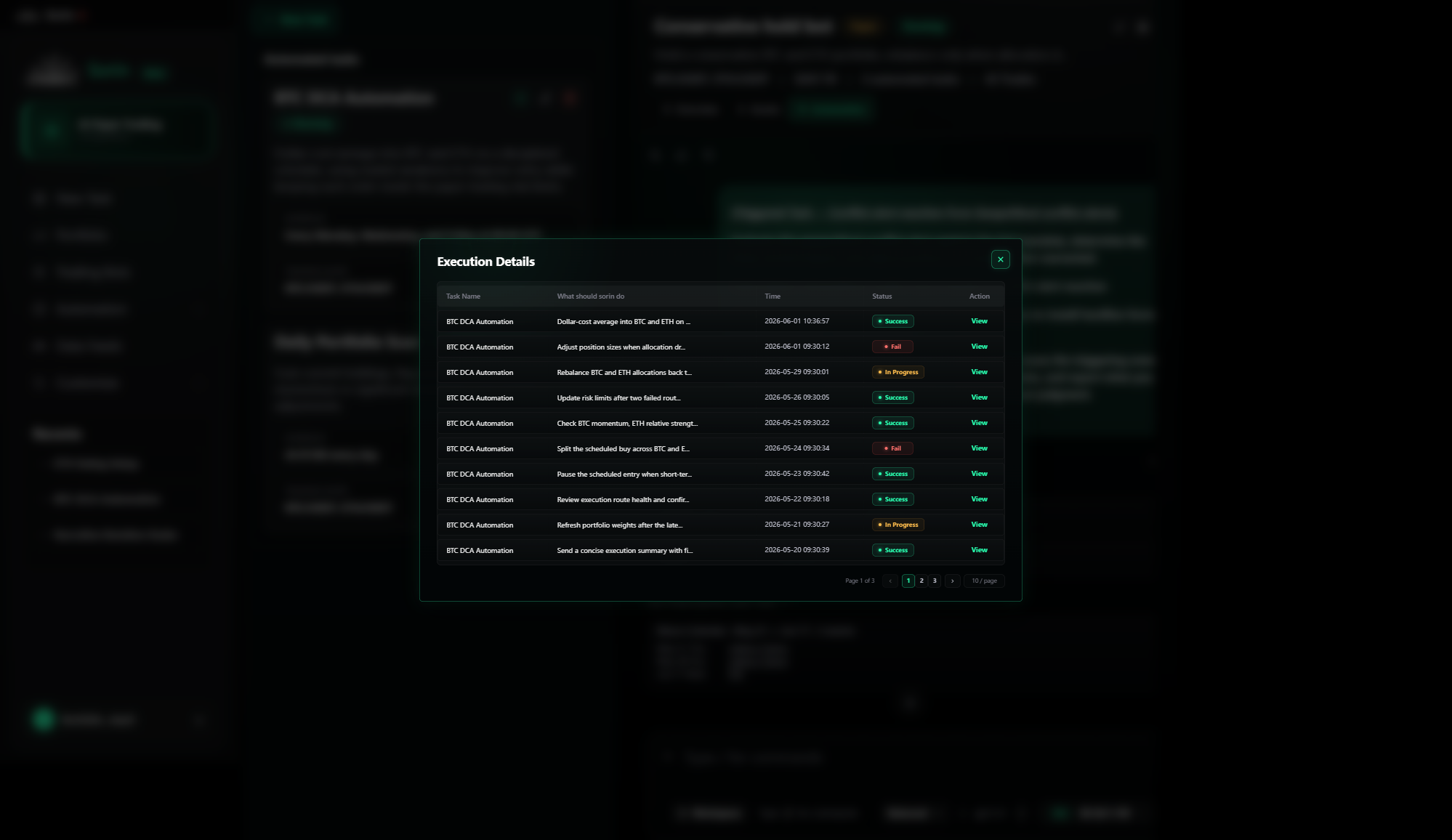
Execution Details modal with task execution rows, statuses, pagination, and View actions.
Page purpose: Show execution history for a selected automation task and provide View links into the task-fired content.

Automation Task Records Modal

1. Changes

  • Add this modal state to the mockups because it appears when the user clicks a concrete task in the Automation drawer.
  • Keep the modal tied to the selected task and show the chat workspace blurred or dimmed behind it.
  • Use the modal as the bridge between task history and the automatically fired content in chat.

2. Current Page Functions

  • Modal title is Execution Details.
  • Table columns are Task Name, What should sorin do, Time, Status, and Action.
  • Rows show the selected task name, truncated task action text, execution timestamp, and status badges such as Success, Fail, and In Progress.
  • Each row includes a View action.
  • Footer shows current page, numbered page buttons, previous/next controls, and page-size control.
  • Close control dismisses the modal and returns to the Automation drawer state.

3. Interaction & Navigation

  • Clicking a task card in the Automation drawer opens this modal for that task.
  • Pagination controls switch between execution-record pages without leaving the modal.
  • Close returns to the Automation drawer and preserves the selected bot context.
  • Clicking View closes or bypasses the modal and opens the Trading Bot detail chat at the fired content generated by that execution record.
  • The View destination must preserve task identity so the fired content title can later trace back to the source task.
Task Fired Content From Records View
Trading Bot detail chat focused on content generated by a task execution record.
Page purpose: Show the chat content automatically fired by an automation task after the user clicks View in the records modal.

Task Fired Content From Records View

1. Changes

  • Add this destination state to document exactly what View from a task record opens.
  • Treat the visible task-fired message as generated content from the selected automation task, not as a manually typed chat prompt.
  • Keep the bot summary card and drawer tabs available while the user reads the fired content.

2. Current Page Functions

  • Chat shows a prominent task-fired content block in the user-message position.
  • Content title identifies the generated item as a triggered task output from Geopolitical conflict alerts.
  • Message body includes the task instruction, subscription and pipeline name, triggering event, and instruction to act on best judgment.
  • Timestamp shows when the fired content entered the chat.
  • Sorin response below the fired content shows processing evidence and generated output blocks.
  • Command composer remains available for follow-up commands in the same bot context.

3. Interaction & Navigation

  • Clicking View on an execution record opens this fired-content chat state.
  • The user remains inside the same Campaign Trading Bot detail workspace.
  • The fired-content title is clickable and is the entry point back to the producing Automation task.
  • Overview, Assets, and Automation tabs remain available from the bot card.
  • Follow-up chat commands continue from this task-fired context.
Fired Content Title Opens Automation Highlight
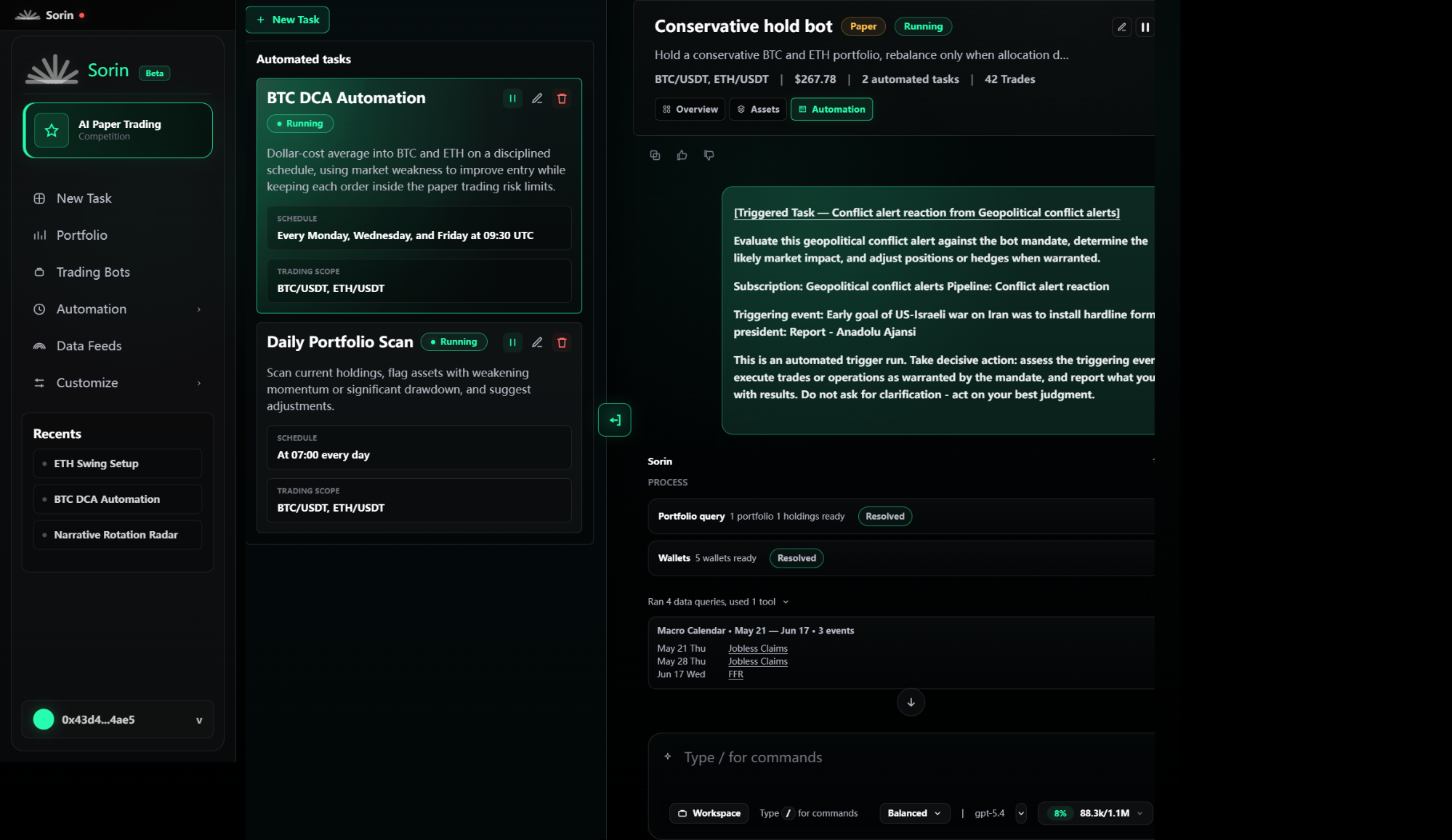
Automation drawer open with BTC DCA Automation highlighted after clicking the fired-content title.
Page purpose: Show the Automation drawer automatically opening and highlighting the source task after the user clicks the fired-content title.

Fired Content Title Opens Automation Highlight

1. Changes

  • Add this traceability state to the mockups because the fired-content title must reveal which task produced the content.
  • Open the Automation drawer from the current chat without navigating away from the detail workspace.
  • Apply a visual highlight or motion cue to the producing task card so the user can identify the source task.

2. Current Page Functions

  • Automation tab is active in the bot card.
  • Automation drawer is open on the left side of the detail workspace.
  • The producing task card, such as BTC DCA Automation, is visually selected or highlighted.
  • Task card retains its normal controls for pause/resume, edit, delete, schedule, and trading scope.
  • Chat with the fired content remains visible on the right so the user can connect the output to the task source.
  • Highlight is temporary or animated but must last long enough for the user to notice the producing task.

3. Interaction & Navigation

  • Clicking the fired-content title opens Automation with force-open behavior even if the drawer was closed.
  • The system selects the task associated with the fired message, using the task identity carried from the execution record or message metadata.
  • If another drawer panel was open, it switches to Automation and applies the task highlight.
  • The user can then pause, edit, delete, or inspect the highlighted task.
  • Closing the drawer returns the user to the same fired-content chat position.
Left Navigation Trading Bots List
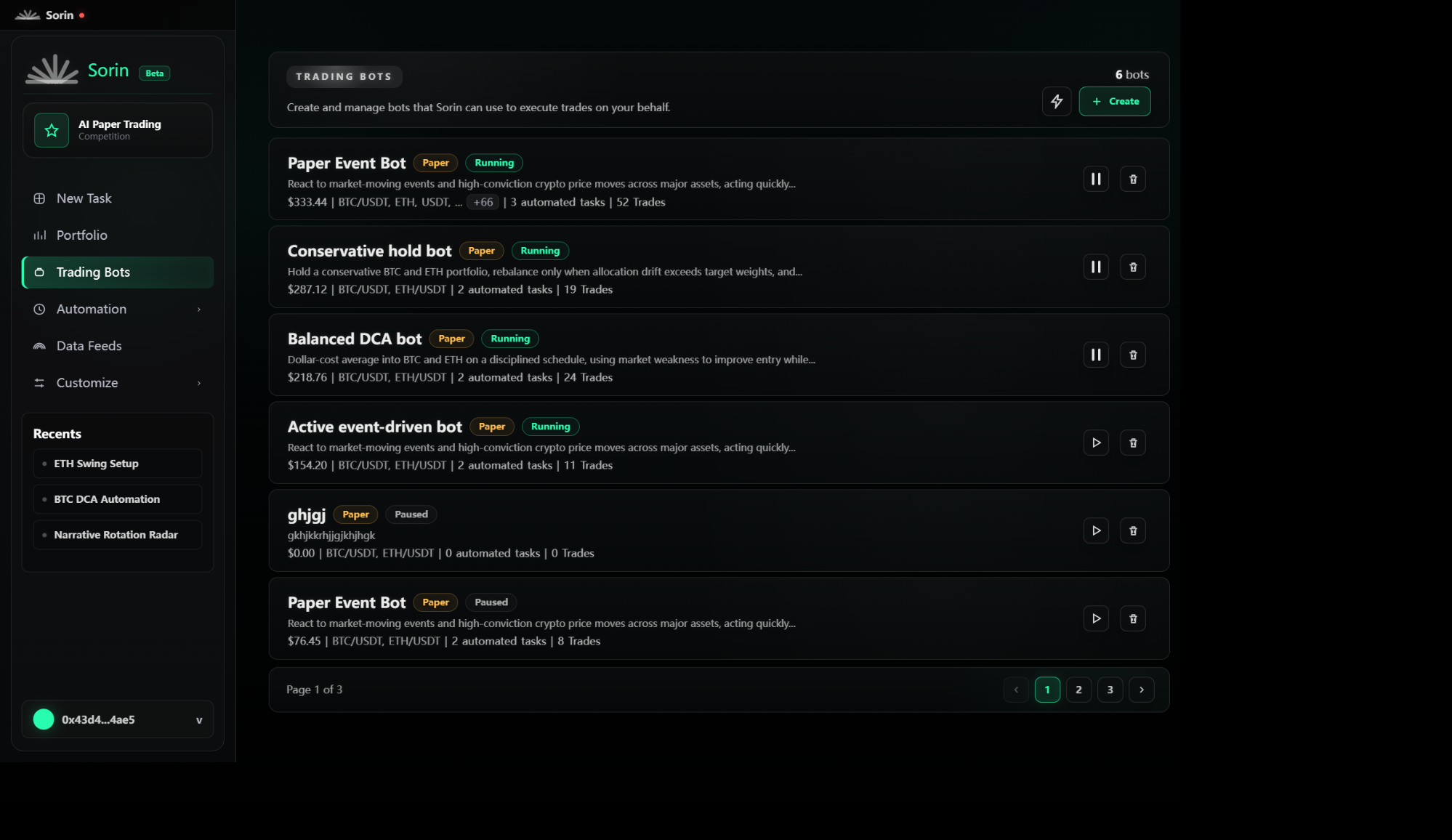
Trading Bots list page with bot cards, running states, create action, and pagination.
Page purpose: Show all Trading Bots reachable from the left sidebar and let the user control or enter a bot using the same detail requirements as the Campaign entry.

Left Navigation Trading Bots List

1. Changes

  • Document the left-sidebar Trading Bots section and all list-page requirements.
  • Do not expand a second detail page spec for list entries; opening a list bot must reuse the Campaign Trading Bot detail workspace requirements.
  • Keep this page focused on discovery, status control, deletion entry, creation entry, pagination, and opening the shared detail workspace.

2. Current Page Functions

  • Left navigation highlights Trading Bots as the active section while keeping Campaign, recents, and wallet visible.
  • Header shows Trading Bots label, explanatory copy, bot count, quick action button, and Create button.
  • List renders six bot cards per page.
  • Each bot card shows bot name, Paper badge, Running or Paused badge, description, current paper value, markets, automated task count, trade count, pause/resume control, and delete control.
  • Visible examples include Paper Event Bot, Conservative hold bot, Balanced DCA bot, Active event-driven bot, a user-created paused bot, and another paused Paper Event Bot.
  • Pagination shows Page 1 of 3, page numbers, previous, and next controls.

3. Interaction & Navigation

  • Clicking Trading Bots in the left sidebar opens this list page.
  • Clicking page numbers or previous/next updates the active page and replaces the six visible bot cards.
  • Clicking pause or resume toggles that bot's Running or Paused state and rerenders the card.
  • Clicking delete starts safe bot removal handling.
  • Clicking Create starts bot creation using the paper bot setup flow when used in campaign-compatible mode.
  • Clicking a bot card outside icon controls opens the same Trading Bot detail workspace documented above; the detail page requirement is identical to the Campaign Trading Bot detail requirement and does not need separate expansion.
  • Keyboard Enter or Space on a bot card opens the same shared detail workspace.